Change Management Documentation
Your single reference point for you to learn about PLM Change Management.
Here, you'll find detailed instructions, FAQs, and troubleshooting tips to resolve common questions.
Release information on functionality changes will be updated regularly. Check out the page when you see a red notification dot on the Help and Support page link.
Create a Support Ticket
If you cannot find the needed answers in this Help guide, or if you need additional access, or want to leave feedback/suggestion - Fill out this form to create a ticket.
About PLM Change Management
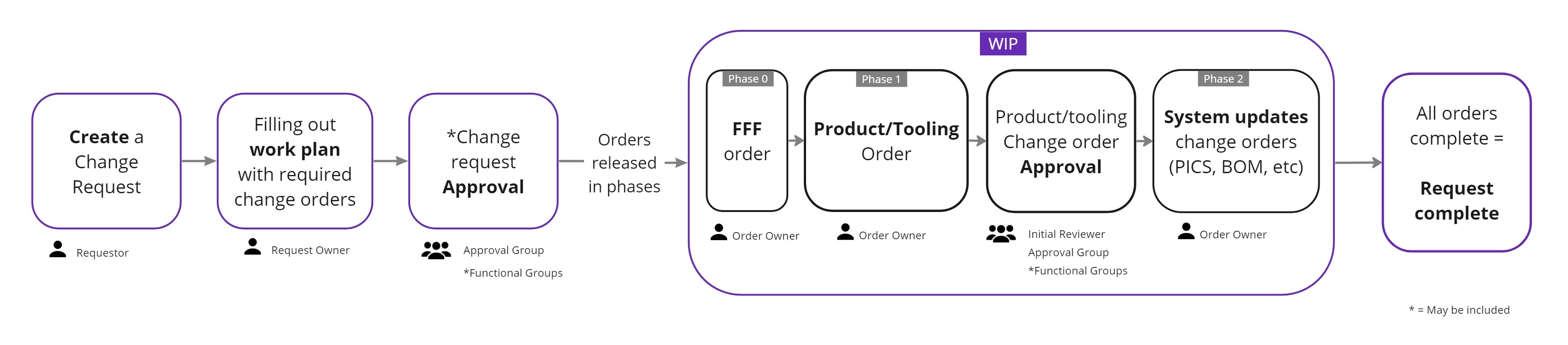
Change Management application replaces ECR, CAD and ECN. It allows users to request changes to Vault files and parts and create new Vault files. It is the first step in Product Lifecycle Management (PLM) that will allow us to manage the lifecycle of our products - from inception to end-of-life.
Workflow Overview
Watch Quick Demos
Recently Released
- Approval selection was changed from a dropdown to a toggle to help people who forget to make the dropdown select of approved vs send back (Mar 23, 2026)
- Functional group approval thresholds can be customizable through an IT change (Mar 12, 2026)
- Approval session allows approvers to go from one approval to the next and jump to any of the approvals in their request or change order approval queue (Mar 6,2026)
- Clicking on the status "pill" on a request from the Tasks page will show a quick view of the related change orders (Mar 6, 2026)
- Tooling change order title will default to the request title (Mar 6, 2026)
- Fixed issue where functional gruops were being added to the tooling change order for HDR functional group automation (Feb 19, 2026)
- Added ability to remove all members of a functional group so that it doesn't show as active and selectable (Jan 29, 2026)
- Automated process to track file name and path changes. The system will automatically account for those and update in progress requests and change orders. If you need to update file types, you can edit it on the artifact details page in Artifact Management.
- Tooling old revision files are accessible on the change order (Nov 13, 2025)
- The Rep Contact will be copied when you check the box to contact customer on ASP artifact admin close (Nov 13, 2025)
- The marketing drawing is accessible on the change order after it is created for review (Nov 13, 2025)
- Fixed ability to withdraw a sent back or pending approval change request or change order (Nov 13, 2025)
- Added Help Page link red dot to notify users when we have released new functionality and updated the Help Page (August 25, 2025)
- The eye button has been updated to display the change request summary page in a side modal rather than navigating to the page (August 25, 2025)
- To get to change request summary page, click on the title of the request. To get to the change order summary page, click on the title of the change order (August 25, 2025)
- Removed the ability for a domain admin to one shot approve a request (August 25, 2025)
- Web Model change order fix to only allow the Web Model team to view the change orders on their task page (August 25, 2025)
- Updated Optics domains and add several functional groups (August 25, 2025)
- Removed ability to withdraw a request when a change order is pending approval. The change order either be withdrawn first or it needs to not be in pending approval status (August 25, 2025)
- Automatically checking the copy to web checkbox when a user clicks Create Marketing Drawing button (August 25, 2025)
- Corrected issue where drawing master table wasn't being updated correctly when there were 2 files with the same name, but different revisions (August 25, 2025)
- Fixed issue when editing information in artifact admin when that artifact is in an in progress change order (August 25, 2025)
- Updated Change Management to use new Artifact Management API to search and access artifacts, rather than referencing the F drive and Print View (August 25, 2025)
- When hitting back button to go back to Tasks page, it will remember which tab you are on (August 25, 2025)
- IE Request and PCN Request domains to allow anyone to create requests from Industrial Engineering or Process Engineering (January 1, 2025)
- Ability to create a change order to manage updates to web models on the website (August 20, 2024)
- Ability to create TEC (Temporary Engineering Changes). (July 22, 2024)
- Domain admins, request owners and product/tooling order owners are able to edit the drawing path, file name and file type of Vault files using the new "Artifacts Admin" page. (June 25, 2024)
- Withdrawing a request with in-progress product/tooling change orders changes the state to pending withdraw, which will require the order owner to back out any changes to Vault files and acknowledge the withdrawal from the order tasks. (June 25, 2024)
- We are displaying the like-part and a link to the ASP on the change request details page. (June 25, 2024)
- Initial reviewer can add comments in addition to the send back comments added by the approval group if sending an order back to the order owner. (April 23, 2024)
- The domain groups page will have domain and group type filters to help find the right group. (April 23, 2024)
- Anyone can create comments and tag users on a change order. (April 23, 2024)
- Ability to create and send form, fit or function customer notifications. (Feb 12, 2024)
- More precise approval groups that allow requests to be approved by impacted functional groups rather that huge request and product owner approval groups. (Jan 30, 2024)
- Ability to change the domain of a submitted request in "Ready" state. (Jan 30, 2024)
- Restricting simultaneous work on the same print: Work orders for a print that has changes in-progress will have a status of "coming-up" until all preceding work is completed. (Jan 8, 2024)